

What is disaster recovery? RTO, RPO, sites & best practices
Disaster recovery is how a business restores its systems, data, and operations after an outage. This guide covers the key terms, how recovery works, and how to plan and test it.
—
Key takeaways
- Disaster recovery is one part of a wider plan to keep your business running, focused on bringing back your IT systems and data.
- Your recovery time objective (RTO) and recovery point objective (RPO) decide what recovery setup you need and what it costs.
- A recovery plan only counts once you’ve tested it and saved the results.
- Most recovery failures come from untested plans and backups that sit on the same network as your live systems.
Most companies don’t think about disaster recovery until forced to by a ransomware scare, an extended outage, an insurer’s audit, or outdated, unsupported software. Each one raises the same question: if your systems went down today, how long would it take to get them back, and how much data would you lose? You can’t answer that until you’ve set recovery targets and tested them.
What is disaster recovery?
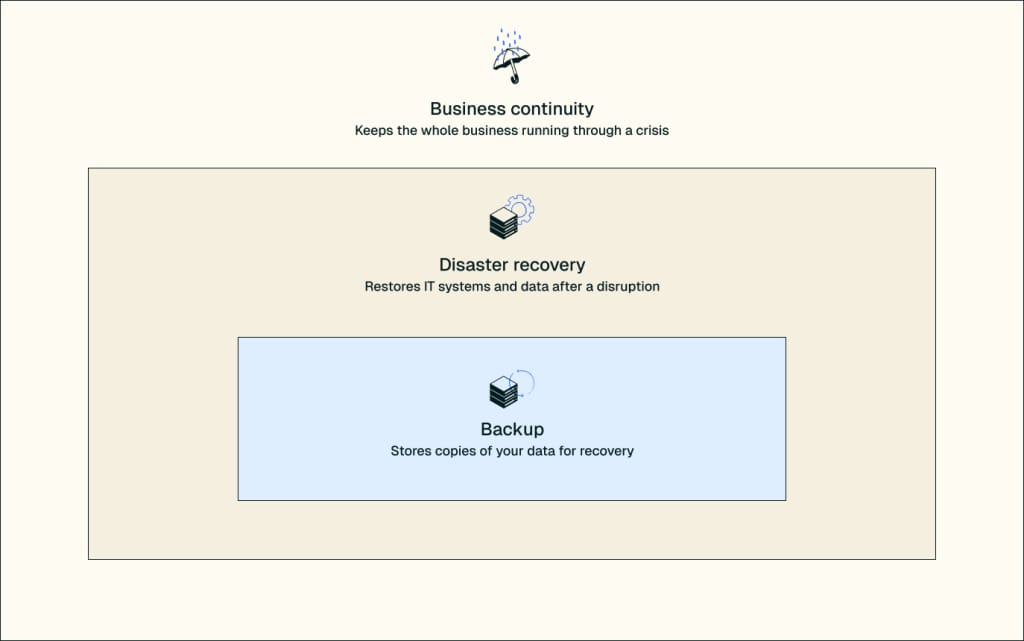
Disaster recovery (DR) is the set of systems and processes that bring your IT systems, data, and operations back online after a disruption, such as a cyberattack, hardware failure, or natural disaster. It covers where your systems run during an outage, how your data gets there, who does the work, and the order systems come back in.
DR is one part of business continuity. A business continuity plan covers how the whole business keeps operating during a disruption, including staff, offices, and customers. Disaster recovery brings back the IT systems that the plan depends on.
Backup is one part of DR. A backup is a copy of your data. DR is everything you need to run on that copy: servers to put it on, a network to reach it, a recovery order, and people to do the work.
Common causes of IT disasters
Common causes of IT disasters include:
- Cyberattacks, especially ransomware, which locks up your servers and your backups at the same time
- Power or hardware failure
- Human error, such as a bad change to a server’s settings or someone deleting the wrong data
- Natural disasters
Disaster recovery concepts and terms
Four terms shape every recovery decision, from how often you copy your data to where your systems run during an outage.
RTO and RPO
RTO and RPO are the two targets every recovery setup is built around.
- Recovery time objective (RTO) is the longest a system can be down before the damage to your business is more than you can absorb.
- Recovery point objective (RPO) is the most data you can afford to lose, measured as time back from the moment of the outage.
Here’s how they work together. Say an online order system has a 15-minute RPO and a one-hour RTO.
The 15-minute RPO rules out nightly backups, which could lose up to a full day of orders. To meet it, you need to copy your data to a second system continuously, or back it up at least every 15 minutes.
The one-hour RTO rules out rebuilding. Setting up a new server, restoring the data, and reconnecting everything takes longer than an hour, so you need a standby system ready to take over.
If the business could live with losing a day of data and being down, nightly backups and a restore cover it, at a much lower cost. The tighter the numbers, the more you pay for speed.
Set targets system by system. For how to work out your numbers, see our guide to RTO vs RPO.
Hot, warm, and cold recovery sites
Hot, warm, and cold recovery sites are the three main places your systems run while your main systems are down. They differ in how quickly they take over and what they cost.
| Site type | What it is | Recovery speed | Relative cost | Best fit |
| Hot | A running copy of your systems, kept up to date with your live data | Fastest; takes over almost immediately | Highest | Systems that stop revenue or service when they go down, like payments, orders, and patient records |
| Warm | Equipment is installed and data is copied on a schedule | Moderate; data has to be loaded and systems started | Moderate | Important systems that can be down for several hours to a day |
| Cold | Space, power, and a network connection, with little or no equipment | Slowest; days or weeks | Lowest | Systems the business can run without for a while |
Choose a site for each system based on its RTO and your budget. A system with a tight RTO needs a hot site, because a cold site can take days to bring online. Most businesses mix them, with a hot site for the few systems they can’t run without and warm or cold sites for the rest.
The 3-2-1 backup rule
The 3-2-1 backup rule says to keep three copies of your data, on two different types of storage, with one copy offsite. If one copy fails or one location goes down, you still have another.
A common update is 3-2-1-1-0. It adds one copy that can’t be changed or deleted (immutable) or that’s kept offline (air-gapped). The zero means your test restores come back with no errors.
Where the copies live matters, too. Ransomware spreads through the passwords and network connections, so a backup your live servers can reach can be locked up along with them. Keep your backups and your recovery documents separate from your live systems. For more, see our guide to disaster recovery for ransomware.
Disaster recovery as a service (DRaaS)
Disaster recovery as a service (DRaaS) is a managed way to run disaster recovery. A provider keeps a ready copy of your systems on its own servers and runs them there when your main systems go down. You don’t have to build or staff a second data center yourself.
DRaaS isn’t only for public cloud. It also works for dedicated servers, virtual private servers (VPS), and private cloud.
DRaaS supports a recovery plan, but it doesn’t replace one. You still need recovery targets, a recovery order, and named people who can declare a disaster.
If you add disaster recovery to Nexcess Managed Cloud, our engineers run your recovery site, run scheduled test switchovers, and answer the phone when something breaks. You decide when to declare a disaster, and recovery starts when you say so. You get one partner and one contract for your servers and your recovery. Read more in our guide to DRaaS, or see how Nexcess disaster recovery works.
How disaster recovery works
Disaster recovery works in five steps:
- Detect. Monitoring tools or your staff spot an outage or an attack.
- Declare. A person authorized to declare a disaster decides to start recovery. That decision is yours, not your provider’s. Agree in writing ahead of time who is allowed to make it.
- Fail over. Your systems start up at the recovery site.
- Cut over and validate. Your DNS settings, which tell browsers where to find your website and apps, are updated to send traffic to the recovery site, and your team checks that applications and data work as traffic arrives.
- Fail back. Once your main systems are cleaned up or rebuilt, everything moves back. Best practice is to move back to a clean server and keep the failed one so you can investigate what went wrong.
How to build a disaster recovery plan
You build a disaster recovery plan by working out what each system is worth to the business, then writing down how to bring it back.
- Run a business impact and risk analysis. Estimate what an hour of downtime costs for each system, including lost revenue, staff who can’t work, and contract penalties. List the threats you face and how likely each one is. Include software that no longer gets security updates, such as CentOS 7 or older Windows servers, since it’s an easy way in for attackers.
- Inventory your systems by priority. Group them as mission-critical, important, or non-essential.
- List what each system needs and the order it comes back in. Include everything a system needs to run, like its database, the system that handles logins, and DNS, and decide what comes back first.
- Set RTO and RPO for each group. Systems in the same group share the same targets.
- Write a runbook with named owners. A runbook is the step-by-step recovery procedure for each system. Name an owner and an alternate for every step, in case the first person can’t be reached.
- Test and review. Test the plan, fix what breaks, and update it whenever your systems change.
Ready.gov’s IT disaster recovery plan guide is a free place to start. For a full walkthrough with examples, see our guide to building a disaster recovery plan.
How to test a disaster recovery plan
A disaster recovery plan is tested in stages, starting with a discussion and working up to a live switchover.
- Tabletop exercise: Your team talks through a scenario, such as a ransomware incident, and finds gaps in roles, access, and contact details.
- Walkthrough: Each owner steps through their part of the runbook on the real systems, without switching anything over.
- Isolated boot test: Your recovery copies start on a separate network to confirm they run. Your live systems aren’t touched.
- Full failover: Your live systems switch to the recovery site, and you time the switch against your RTO.
Test once a year and after any major change, like a migration or a new critical application. A new server, an update, or a new network address that your recovery copy and runbook don’t account for is called configuration drift, and over time it means the plan no longer restores what you actually run.
Keep a record of what you tested, when, how long it took, what failed, and what you changed. Auditors ask for these records. PCI DSS, for example, requires the incident response plan, including its recovery procedures, to be tested at least every 12 months, and a tabletop exercise can count if it covers every element the standard lists.
Disaster recovery and compliance
Most compliance frameworks require disaster recovery, but the requirement usually sits inside a broader rule on emergency planning, incident response, or keeping systems available, so it’s easy to miss. Here’s where it appears in four common frameworks.
| Framework | Where disaster recovery appears | Testing expectation | Evidence to keep |
| HIPAA Security Rule | The contingency plan standard, 45 CFR 164.308(a)(7), which requires a data backup plan, a disaster recovery plan, and an emergency mode operation plan | Procedures for testing and revising those plans, with no set frequency | Written contingency plan, backup logs, test records, and revision history |
| PCI DSS v4.0.1 | The incident response plan (Requirement 12.10.1), which must include business recovery and continuity procedures and data backup processes | Reviewed and tested at least once every 12 months (Requirement 12.10.2) | A test report that covers every element of 12.10.1, plus an annual review record |
| SOC 2 | The Availability criteria, when they’re part of the audit: backup and recovery systems (A1.2) and testing of recovery procedures (A1.3) | Recovery testing during the audit period | Test results and backup monitoring records |
| GDPR | Article 32(1)(c), which requires the ability to restore access to personal data in a timely manner after an incident | Regular testing of security measures under Article 32(1)(d), with no set frequency | Records of tests and assessments |
Benefits of disaster recovery
The benefits of disaster recovery show up when something breaks.
- Continuity: The business keeps operating while your main systems are down.
- Less downtime: You switch over instead of rebuilding. In Uptime Institute’s 2026 outage analysis, 57% of respondents said their most recent major outage cost more than $100,000.
- Security: After a ransomware attack, you have a clean copy of your systems to run from while the originals are investigated.
- Compliance evidence: Test records show auditors, insurers, and customers that your recovery works.
- Customer trust: Orders, appointments, and accounts stay available.
If you don’t have a recovery team of your own, managed disaster recovery gives you these benefits with less risk, predictable cost, and expert-managed support.
What drives disaster recovery cost
Two things drive the cost of disaster recovery: how much you protect and how fast you need it back.
- Amount of data: how much you protect and how often it changes
- Recovery speed: tighter RTO and RPO targets, and hot sites over warm or cold ones, cost more
- Number of servers: each server you protect adds to the total
- Testing frequency: more frequent tests take more time and resources
- Support level: running recovery yourself costs staff time, and having a provider run it costs a service fee
Common disaster recovery mistakes
Most recovery failures trace back to a decision made months before the outage.
In October 2026, a power event in one of three Google Cloud zones in London locked Lloyds, Halifax, HSBC and Revolut customers out of their banking apps for several hours. Multi-zone on the diagram doesn’t mean multi-zone in practice. A single database, queue or login service pinned to one zone takes the whole system down with it. Resilience is only as good as the least redundant thing in the request path, and that’s usually the dependency nobody drew.
The mistakes that come up most:
- The plan has never been tested, so nobody knows whether it works.
- Backups sit on the same network as your live systems, where ransomware can reach them.
- The runbook describes systems you no longer run.
- Nobody is named to declare a disaster, so recovery waits on a decision.
- Something a system needs is missed, like a license key or a DNS record, and it stalls the restore.
- IT sets RTO and RPO without asking the business what downtime actually costs.
- The recovery site shares something with production, like the login system, DNS, or a license server, so it can’t start when production is gone.
Next steps
If you don’t have recovery targets yet, start with a business impact analysis and set RTO and RPO for your most critical systems. If you have a plan but haven’t tested it, schedule a tabletop exercise.
If you’d like help, talk to a Nexcess engineer about your recovery targets and current setup, or see how Nexcess disaster recovery works.
Disaster recovery FAQs
A backup is a copy of your data that you restore from when files are lost, corrupted, or locked by ransomware. Disaster recovery is the full process of getting your systems running again, including the servers, network, recovery order, and people. Backup is one part of disaster recovery.
Disaster recovery brings back IT systems and data after an outage. Business continuity covers how the whole business keeps operating, including staff, offices, customers, and suppliers. Disaster recovery is one part of a business continuity plan, focused on the technology the rest of the business depends on.
Test your disaster recovery plan at least once a year and after any major change, such as a migration, a new critical application, or staff turnover. PCI DSS requires testing at least every 12 months. A tabletop exercise takes a few hours, so you can run one more often.
Yes. Cloud providers keep their own systems running, but bringing back your data, settings, and applications after a bad change, an outage at the provider, or ransomware is usually your job unless you’ve bought a managed service. Check your provider’s terms to see what they cover and what stays with you.
Disaster recovery costs depend on how much data you protect, how fast you need to recover, how many servers you run, how often you test, and whether you run it yourself or use a provider. Tighter RTO and RPO targets cost more, so start by setting targets for each system.

Table of contents
Get hosting news and tips straight to your inbox
Join our community today.
Essential Hosting Resources to help your business stay ahead
Share this page


