

VMware alternatives: best competitors, free options, and how to choose
Compare the leading VMware alternatives, including free options like Proxmox VE and KVM, plus what each one asks of your team to run it.
—

Broadcom changed VMware’s pricing and packaging, and because of this a lot of businesses are shopping for the first time in years. Here’s how Nutanix, Proxmox, Hyper-V, and other alternatives compare, including what each one costs to run.
Key takeaways
- Nutanix AHV, Proxmox VE, Hyper-V, Scale Computing HyperCore, and Red Hat OpenShift Virtualization are the five alternatives most teams shortlist after Broadcom’s licensing and packaging changes.
- Your choice depends on whether your stack runs Linux or Windows, how much hypervisor expertise sits in-house, and whether you need a hypervisor swap or a different arrangement entirely.
- Free options like Proxmox VE carry no licensing fee, though they move the cost from the license line to the payroll line.
- If you’re shopping because no one at your company wants to own another platform, the right answer may be a managed environment rather than a different hypervisor.
The best VMware alternatives at a glance
| Platform | Type | Licensing model | Best for | What it asks of your team |
| Nutanix AHV | Hyperconverged infrastructure (HCI) | Subscription | Teams replacing vSphere and vSAN together, with support behind it | Platform training, plus someone to design, migrate, and operate it |
| Proxmox VE | Open-source hypervisor (KVM + LXC) | Free | Linux-comfortable teams who want a full-featured hypervisor at no license cost | Command-line fluency, your own patching discipline, your own on-call support |
| Microsoft Hyper-V / Azure Stack HCI | Native Windows hypervisor | Included with Windows Server | Windows-first shops already running Active Directory | Windows Server licensing math and full operational ownership |
| Scale Computing HyperCore | All-in-one appliance | Subscription | Edge sites, branch locations, and smaller environments | Quick setup, ongoing patching and on-call coverage |
| Red Hat OpenShift Virtualization | VMs on Kubernetes (KubeVirt) | Subscription | Organizations already running Kubernetes as their operating model | Kubernetes expertise |
| Managed private cloud on Nutanix | Dedicated infrastructure, operated for you | Fixed monthly | Businesses that need their own environment and have no one to run it | Oversight while the provider handles the day-to-day |
The top VMware alternatives
1. Nutanix AHV
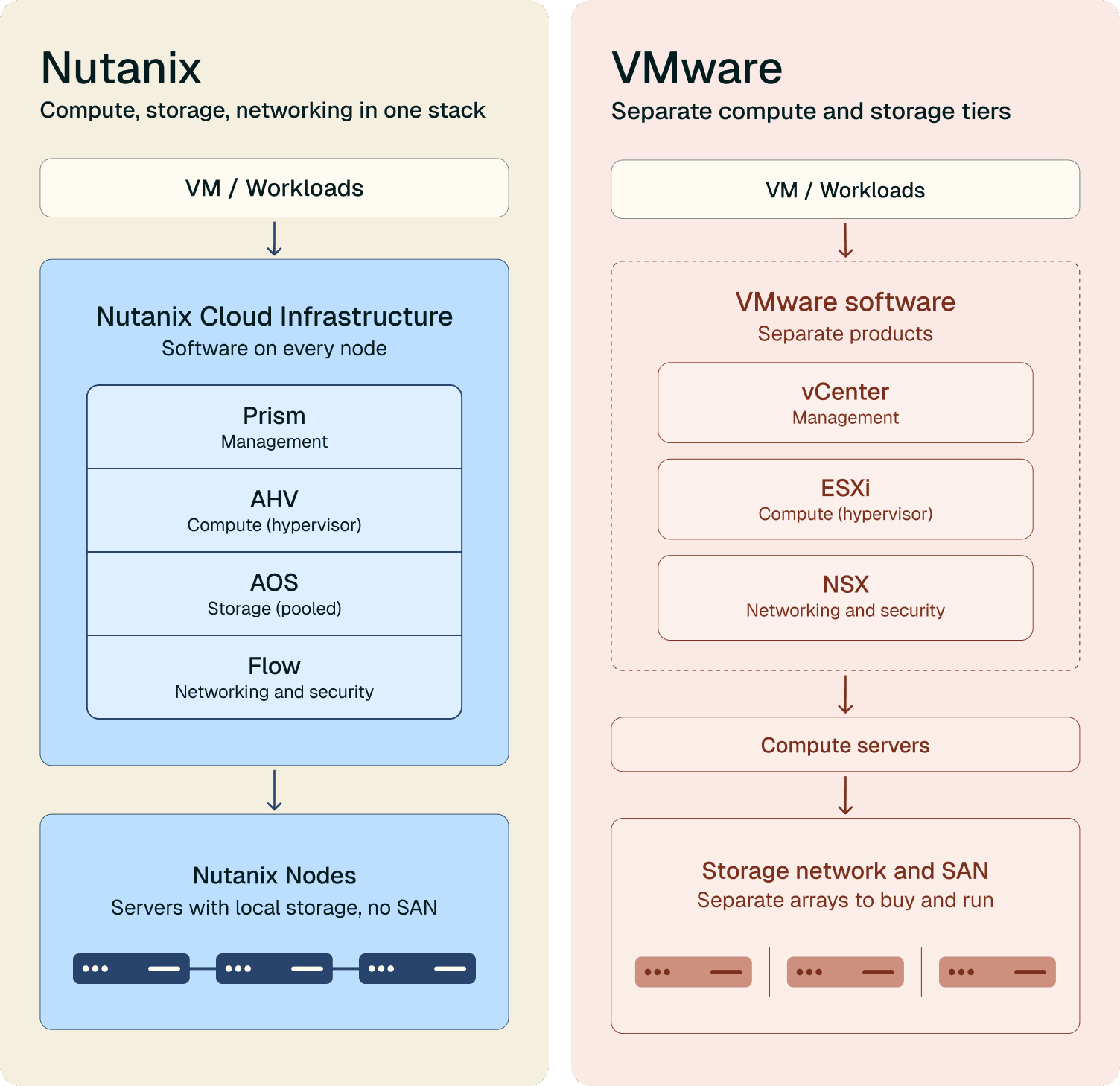
Nutanix is a hyperconverged infrastructure (HCI) platform, which means it combines compute, storage, and virtualization into one system instead of three products you buy and connect yourself. Nutanix’s Acropolis Hypervisor (AHV) comes with the platform rather than as a separate license you have to purchase and manage.
Nutanix comes up first in most migration conversations because if you run vSphere, vSAN, and software-defined networking today, it replaces the arrangement rather than one piece of it. Teams evaluating a swap find fewer loose ends, because the storage layer and the hypervisor ship together and one vendor supports both.
Best for: organizations that want to replace vSphere, vSAN, and networking with one platform from one vendor, instead of assembling and supporting each layer separately.
What it asks of your team: buying Nutanix gets you licenses, hardware, and a quote for the migration. You still need to figure out who designs the environment, manages it, and supports it when something breaks. Nutanix gives three options: buy professional services, find a partner, or do it yourself.
2. Proxmox VE
Proxmox VE is open-source virtualization built on KVM and LXC. There is no license fee and paid support subscriptions start low.
Many companies run production workloads on Proxmox. Clustering, live migration, built-in backup, snapshots, and a capable web interface all ship in the free version. The community around it is active and the documentation is good.
Best for: teams with Linux depth who want a hypervisor without a licensing line item.
What it asks of your team: command-line familiarity, your own patching and update schedule, your own backup verification, and your own answer when something fails overnight. The software costs nothing, but running it costs a salary and potentially a new hire.
3. Microsoft Hyper-V and Azure Stack HCI
Hyper-V ships with Windows Server, so if you’re already running Windows Server, you can turn it on without buying a new hypervisor license. Azure Stack HCI builds on that same Hyper-V hypervisor, packaged into a hyperconverged setup with Azure services attached. If your team lives in Windows Admin Center every day, the learning curve here is the shortest of any option.
Best for: Windows-first environments already running Active Directory, Group Policy, and the Microsoft management stack.
What it asks of your team: working through the Windows Server licensing math, which changes depending on core counts and edition, plus patching, backups, and on-call coverage, since you’re running the platform yourself.
4. Scale Computing HyperCore
HyperCore bundles virtualization, storage, and management into an appliance you rack and turn on. A traditional setup means separate servers, storage arrays, and networking gear to configure and keep running. HyperCore combines all three into one appliance, so there’s less hardware to manage, even though it doesn’t match vSphere feature for feature.
Best for: edge deployments, retail and branch sites, manufacturing floors, and smaller central environments.
What it asks of your team: ongoing monitoring and maintenance, and scaling as sites grow.
5. Red Hat OpenShift Virtualization
OpenShift Virtualization uses KubeVirt to run virtual machines next to containers on the same Kubernetes control plane. Your VMs become objects Kubernetes schedules. If Kubernetes is not already how your team works, this is a considerably larger change than replacing a hypervisor, and treating it as a like-for-like swap ends badly.
Best for: organizations that already run Kubernetes as their operating model and want one platform for both application styles.
What it asks of your team: Kubernetes expertise.
Honorable mentions: KVM with oVirt, XCP-ng, and public cloud
KVM with oVirt gives you the same virtualization technology behind Proxmox: it’s built into the Linux kernel and turns a Linux server into a hypervisor. oVirt is a free management layer on top of it, giving you a web console to run VMs across multiple hosts. Red Hat used to fund oVirt’s development, but it’s now maintained by volunteers. Check how active that community is before you commit.
XCP-ng is a free, open-source hypervisor. It’s an independently maintained rebuild of Citrix Hypervisor (formerly XenServer). You get the same core technology with no license fee, managed through a separate free tool called Xen Orchestra. If you’ve used Citrix Hypervisor or XenServer, the platform will feel familiar.
Public cloud IaaS on AWS, Azure, or Google works well for demand that spikes and collapses. For steady workloads on older software, you pay a premium for flexibility. If your usage looks the same every day, do the math for peak hours before you commit.
Free VMware alternatives and their hidden costs
Interest in free VMware alternatives climbed sharply after the Broadcom changes. These include:
- Proxmox VE without a subscription
- XCP-ng with community support
- KVM with oVirt
- Hyper-V, if you already hold Windows Server licensing
These platforms run production workloads, handle clustering and live migration, with support teams that can help.
Where the cost appears
The cost of running a platform yourself spreads across places that finance doesn’t track as infrastructure spend:
- Patching and updates: Somebody has to schedule, test, and apply them, every month.
- Backup and recovery: Configuring backups and verifying that they restore takes ongoing discipline that most small to mid-sized teams don’t have resources for.
- Overnight coverage: Free software doesn’t answer the phone in the middle of the night.
- Retraining: A team fluent in vSphere needs months to reach the same fluency somewhere else.
- Concentration of knowledge. One person understands the new environment, and if they leave, the environment stays but the understanding goes with them.
The question to answer for your finance lead: what does a free hypervisor cost after we include the person who maintains it?
For a team with Linux depth and capacity, free works. For a business running on one or two generalists, free software plus extra headcount adds up to more than the license it replaced.
How to choose the right VMware alternative
Start with your operating system stack
- Linux-first environments point toward Nutanix AHV, Proxmox, or KVM.
- Windows-first environments running Active Directory point toward Hyper-V and Azure Stack HCI.
Mixed environments can go either way, so choose the side your team knows better.
Be honest about your team’s expertise
Your IT generalist can probably learn a new virtualization environment, but that learning curve has business impact. Consider what stops happening while they learn it, and who covers the environment during the months before they know it well.
Commercial platforms like Nutanix, HyperCore, and OpenShift Virtualization come with a support contract, so when something breaks, you can call the vendor instead of solving it alone. That doesn’t remove the need for in-house expertise, but it helps a lot.
Open-source platforms like Proxmox and XCP-ng don’t include that support by default. Your team owns troubleshooting, patching, and incident response from the start. You’ll rely on community forums and documentation if you need more support.
Decide whether you need a hypervisor or a different arrangement
Three paths sit in front of you:
- Swap the hypervisor and keep running it yourself. Same operating model, new platform, new learning curve.
- Move to HCI. Fewer products to manage, more change at once, and a full replacement of how your storage layer works.
- Stop running infrastructure. Hand the operation to a provider and keep the environment.
Feature parity against vSphere
Every vSphere admin asks what happens to the features I depend on?
| vSphere capability | Nutanix AHV | Proxmox VE | Hyper-V | HyperCore | OpenShift Virt |
| vMotion (live migration) | Yes | Yes | Yes (Live Migration) | Yes | Yes |
| DRS (load balancing) | Yes (ADS) | Manual | Yes (with SCVMM) | Yes | Yes (scheduler) |
| High availability | Yes | Yes | Yes (with failover clustering) | Yes | Yes |
| vSAN (software-defined storage) | Yes (built in) | Yes (Ceph or ZFS) | Yes (Storage Spaces Direct) | Yes (built in) | Yes (ODF) |
| Snapshots and backup integration | Yes | Yes (built-in backup) | Yes | Yes | Partial, third-party common |
| NSX-style networking | Yes (Flow) | Partial, manual | Yes (with SDN stack) | Partial | Yes |
| Distributed switch | Yes | Partial | Yes | Built in | Yes |
Planning the migration
Deciding on a migration is the first step, but managing the move is a big project. Start with the basics:
A migration in eight steps
- Inventory what you run. Every VM, dependency, and integration
- Decide what moves and what retires. Migrations surface workloads nobody has touched in years.
- Choose the target and size it. Migrate at your current sizing first. Resizing at the same time makes it harder to tell whether a problem came from the new platform or the new sizing.
- Rebuild the network. This includes IP addressing, VLANs, firewall rules, VPN tunnels, and DNS.
- Convert and copy the VMs. Disk format conversion, guest tool replacement, driver changes.
- Test everything. Application-level testing with the people who use the applications.
- Cut over. Do this during a planned window with a defined rollback point.
- Keep the old environment intact until you are certain the new environment is running correctly.
The parts that go wrong during a migration
Networking. IP addressing, firewall rules, and site-to-site VPN tunnels all have to land correctly on the first attempt
VM format conversion. VMware stores each VM’s disk in its own file format (VMDK). Moving platforms means converting that file to the new format, like QCOW2 for Proxmox or VHDX for Hyper-V. Each VM also runs a small VMware agent inside the guest OS. Swap it for the new platform’s agent in every VM, or the OS won’t run right.
Backup and disaster recovery tooling. Your backup product was chosen for vSphere and integrates with vSphere APIs. Find out which vendors support it before you move.
Retraining. Your team’s vSphere knowledge doesn’t transfer cleanly.
The switchover window. Planning a cut over for a low-traffic window means it’s probably going to be someone’s evening or weekend. Set that up ahead of time, identify the team member(s) needed, and pay them for that extra time.
A different kind of VMware alternative: infrastructure someone else runs
Let’s come back to that third question: who does the migration and who runs it afterward?
With Nexcess Managed Cloud powered by Nutanix, we design the environment, manage the migration, run the day-to-day operations, monitor 24/7, and patch and support when you need it.
You can choose from two models. The hardware changes between tiers ,but the service doesn’t:
Multi-tenant managed cloud puts a small number of customers on the same physical hardware, each in a separate, isolated environment. Dedicated managed cloud gives you the physical nodes to yourself, for businesses where an auditor, insurer, or contract requires physical separation in writing.
Two distinct benefits:
- The move happens once. Your systems keep running while we copy them to your new environment. The switchover is a short, planned window. Your old environment stays intact until we’re certain it can run properly in the new environment. We handle the network rebuild ourselves.
- You get separation you can prove. Isolation from other customers, encrypted data, additional login security, and documentation you can hand to an auditor, insurer, or client. Our environments are PCI-ready and HIPAA-ready, with the evidence to back it up. Compliance ownership stays with you.
VMware alternative FAQs
Proxmox VE, for most teams. It ships clustering, live migration, built-in backup, and a capable web interface in the free version, with optional paid support. XCP-ng suits teams coming from XenServer. Both ask real Linux skills of whoever runs them.
Yes, and many companies run it that way. The decision turns on your team rather than the platform. Proxmox covers the core capabilities vSphere admins depend on, though features like automated load balancing take more manual setup.
For Windows-first environments, yes. It ships with Windows Server, integrates with Active Directory and the Microsoft management stack, and handles live migration and failover clustering. Check your core-count licensing before you assume it costs you nothing.
vSphere virtualizes compute and pairs with vSAN for storage and NSX for networking. Nutanix combines all three into one platform with one vendor supporting it. AHV is the hypervisor inside that platform and carries no separate license fee.
No. Containers and Kubernetes suit some workloads, and rewriting an application that works is a project few businesses fund. Replacing your hypervisor and keeping your VMs is a complete, legitimate answer.
It depends on how many workloads you run, how tangled the networking is, and how much testing your applications need. Discovery and planning usually take longer than the copying does. Any provider who quotes you a timeline before seeing your environment is guessing.
Backup products integrate with specific hypervisor APIs, so your current tooling may or may not follow you. Confirm support for your target platform during evaluation. At Nexcess, backups and disaster recovery are separate products you add to either tier, and the same team operates those too.
Sometimes. Proxmox, Hyper-V, and KVM run on most existing servers. Nutanix and HyperCore have hardware requirements. Moving to a hosted private cloud removes the hardware question from the decision entirely.
Broadcom raised minimum license purchase requirements, moved from perpetual licenses to subscriptions, and combined many separate products into a few large bundles. Support terms tightened and some product lines were discontinued. For businesses with no infrastructure staff, the discontinued products matter more than the pricing, because they mean someone else decides what you depend on and for how long.

Table of contents
Get hosting news and tips straight to your inbox
Join our community today.
Essential Hosting Resources to help your business stay ahead
Share this page


